Sharing Code Across Multiple Targets In Compose Multiplatform

While working on my recent Compose Multiplatform app, Sync Sphere, I added Desktop as a new target. Now supporting Android, iOS, and Desktop, there was some specific code that I wanted to share and have the same between Android and iOS, but differ on Desktop.
One solution is to have the code duplicated and live under androidMain and iosMain under the shared module. However, duplicating code like that isn't a good path forward for a multitude of reasons.
Adding a shared source set between Android and iOS was a perfect solution for me here, allowing me to have one definition for both mobile platforms.
Starting with the interface and class definitions in commonMain
interface RoomRepository {
    ...
}
expect class RoomRepositoryImpl(
    dictionary: Dictionary,
    // CrashReporting is also an interface that has expect / actual
    // implementations that are the same on mobile, but differ on Desktop
    crashReporting: CrashReporting,
) : RoomRepository
In desktopMain, I can define my RoomRepositoryImpl like normal
actual class RoomRepositoryImpl actual constructor(
    dictionary: Dictionary,
    crashReporting: CrashReporting,
) : RoomRepository {
    ... Desktop specific implementation
}
Now on the mobile side, I created a new folder under the shared module called mobileMain
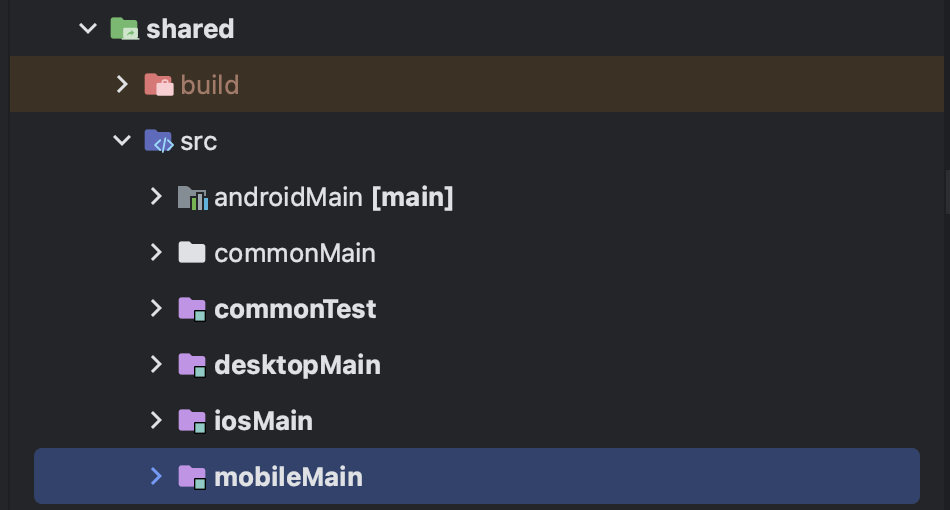
I register mobileMain as a source set in the shared module's build file like so:
        val mobileMain by creating {
            androidMain.dependsOn(this)
            iosMain.dependsOn(this)
            dependencies {
                dependsOn(commonMain)

                .. other dependencies
            }
        }
And now, I am able to put my common mobile implementation for RoomRepository that can be shared between Android and iOS!
About the author
- Hey! I’m Joe! I’m an Android developer who is passionate about the human side of software development.
Comments
Join the discussionNo comments yet. Be the first to comment.


