Using Robolectric in offline mode (a fix for Gradle parallel execution)

Recently, we enabled parallel execution on our Android project. With good performance gains in our build times came some flakiness from our Robolectric tests. We noticed roughly 20 percent (a completely anecdotal account) of the time, our tests would fail with a NoClassDefFound or NoSuchFieldError error.
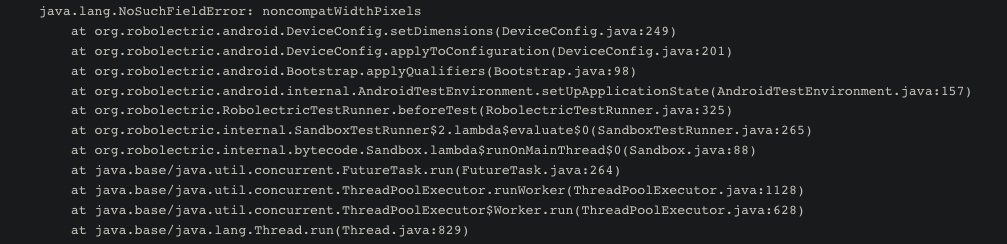
Searching for this issue on the Robolectric Github pages brings to light that others are experiencing a similar issue as well.
One of the recommended approaches for dealing with this issue is using Robolectric in offline mode and either manually downloading the dependencies ahead of time or having Gradle download them at configuration time.
At the time of writing for Robolectric version 4.8.1, this was the approach we took to download the dependencies at configuration time.
In a file we will call `robolectric.gradle,' we can add the following code:
configurations {
    robo16Instrumented
    robo21
    robo21Instrumented
    robo28Instrumented
    robo29Instrumented
    robo31
    robo31Instrumented
    robo32Instrumented
}

dependencies {
    robo16Instrumented "org.robolectric:android-all-instrumented:4.1.2_r1-robolectric-r1-i4"
    robo21 "org.robolectric:android-all:5.0.2_r3-robolectric-r0"
    robo21Instrumented "org.robolectric:android-all-instrumented:5.0.2_r3-robolectric-r0-i4"
    robo28Instrumented "org.robolectric:android-all-instrumented:9-robolectric-4913185-2-i4"
    robo29Instrumented "org.robolectric:android-all-instrumented:10-robolectric-5803371-i4"
    robo31 "org.robolectric:android-all:12-robolectric-7732740"
    robo31Instrumented "org.robolectric:android-all-instrumented:12-robolectric-7732740-i4"
    robo32Instrumented "org.robolectric:android-all-instrumented:12.1-robolectric-8229987-i4"
}

def robolectricDependencies = "${rootProject.buildDir.path}/robolectric"

task fetchRobolectricDependencies(type: Copy) {
    from configurations.robo16Instrumented
    from configurations.robo21
    from configurations.robo21Instrumented
    from configurations.robo28Instrumented
    from configurations.robo29Instrumented
    from configurations.robo31
    from configurations.robo31Instrumented
    from configurations.robo32Instrumented
    into robolectricDependencies
}

subprojects {
    afterEvaluate {
        if (project.plugins.hasPlugin("com.android.application") || project.plugins.hasPlugin("com.android.library")) {
            android {
                testOptions.unitTests.all {
                    systemProperty 'robolectric.offline', 'true'
                    systemProperty 'robolectric.dependency.dir', robolectricDependencies
                }
            }

            tasks.withType(Test) {
                it.dependsOn fetchRobolectricDependencies
            }
        }
    }
}
and we will add that to our root build.gradle file via
apply from: "$project.rootDir/gradle/robolectric.gradle"
What this Gradle snippet is doing for us is adding the robolectric.offline property as well as the robolectric.dependency.dir property to point to the download dependencies to any project that has the application or library plugin (our main app module and the subsequent library modules that it depends on).
The exact dependencies Robolectric requires might vary for you when running in offline mode. The missing jar required by Robolectric will usually surface itself in a test failure looking something like:
java.lang.IllegalArgumentException: Path is not a file: /<build_dir>/robolectric/android-all-instrumented-12-robolectric-7732740-i4.jar
where the jar is the dependency that you should require in robolectric.gradle
With the Gradle script above, we were successfully able to add org.gradle.parallel=true without any flaky behavior from Robolectric.
About the author
- Hey! I’m Joe! I’m an Android developer who is passionate about the human side of software development.
Comments
Join the discussionNo comments yet. Be the first to comment.


